
Flamey
AI Sequence Builder
Designing the AI-powered sequence creation flow for B2B sales teams
to build outbound campaigns with confidence and speed.
Designing the AI-powered sequence creation flow for B2B sales teams to build outbound campaigns with confidence and speed.
In 96 hours, I designed a new AI-native sequence creation flow for Flamey AI, starting from the moment a user clicks Create Sequence in the dashboard. Working solo, I used rapid research, tight prioritization, and AI-assisted workflows to turn an ambiguous brief into a focused, testable prototype. The result is a clearer, more guided experience that helps users move from setup to launch with less friction and more confidence in AI-generated output.
Role
Role
Product/UX Designer
Product/UX Designer
Tools
Tools
Figma, Figma Make, ChatGPT, Gemini
Figma, Figma Make, ChatGPT, Gemini
Timeline
Timeline
96 hours (4 days)
Outcome:
A high-fidelity, interactive prototype with defined user flows, product positioning, UX writing, and core interaction patterns
Outcome:
A high-fidelity, interactive prototype with defined user flows, product positioning, UX writing, and core interaction patterns
Outcome:
A high-fidelity, interactive prototype with defined user flows, product positioning, UX writing, and core interaction patterns
Why this project matters
Why this project matters
Making AI Sequence Creation Feel Clear,
Not Complicated
Making AI Sequence Creation Feel Clear,
Not Complicated
The challenge was to design a product experience around a loosely defined problem space. The brief left room for interpretation, which made the risk clear: without sharp framing, the solution could easily become bloated, unfocused, or surface-level. The problem was not just speed. It was helping users trust what the AI was doing, understand what to provide, and feel confident enough to launch.
The challenge was to design a product experience around a loosely defined problem space. The brief left room for interpretation, which made the risk clear: without sharp framing, the solution could easily become bloated, unfocused, or surface-level. The problem was not just speed. It was helping users trust what the AI was doing, understand what to provide, and feel confident enough to launch.
The opportunity was to:
Clarify the real user need
Define a realistic product scope
Deliver a coherent, usable experience under extreme time constraints
The opportunity was to:
Clarify the real user need
Define a realistic product scope
Deliver a coherent, usable experience under extreme time constraints
This project became an exercise in product thinking as much as interface design.
This project became an exercise in product thinking as much as interface design.
Rapid Research and Problem Framing
Rapid Research and Problem Framing
Finding the Highest-Risk Part of the Flow
Finding the Highest-Risk Part of the Flow
With only 96 hours, I used research to reduce product risk, not to run a full research cycle. The brief showed that sales users understood the value of automation, but still found sequence creation confusing and time-consuming.
So I reframed the problem from:
“How can AI generate a sequence?”
to:
“How can AI help users build a sequence faster, while keeping enough guidance and control to trust the output?”
With only 96 hours, I used research to reduce product risk, not to run a full research cycle. The brief showed that sales users understood the value of automation, but still found sequence creation confusing and time-consuming.
So I reframed the problem from:
“How can AI generate a sequence?”
to:
“How can AI help users build a sequence faster, while keeping enough guidance and control to trust the output?”
Research inputs
Brief findings:
Users needed speed, but also clarity and confidence.
Competitor audit:
I reviewed Apollo, Attio, and 11x to compare sequence setup, automation, and AI assistance.
Workflow breakdown:
I mapped the flow from new sequence to editing, scheduling, and launch.
AI-assisted synthesis
I used AI to organize notes, compare patterns, and stress-test assumptions. I treated it as a synthesis tool, not a source of truth.
Research inputs
Brief findings:
Users needed speed, but also clarity and confidence.
Competitor audit:
I reviewed Apollo, Attio, and 11x to compare sequence setup, automation, and AI assistance.
Workflow breakdown:
I mapped the flow from new sequence to editing, scheduling, and launch.
AI-assisted synthesis
I used AI to organize notes, compare patterns, and stress-test assumptions. I treated it as a synthesis tool, not a source of truth.

Competitor Evidence
Competitor Evidence
Source
Source
What it showed
What it showed
Design takeaway
Design takeaway


Clear cards, status visibility, and automation feedback
Clear cards, status visibility, and automation feedback
Make each AI-generated step visible, editable, and easy to scan
Make each AI-generated step visible, editable, and easy to scan


Powerful, but dense and overwhelming for newer users
Powerful, but dense and overwhelming for newer users
Use simpler defaults and avoid exposing every control upfront
Use simpler defaults and avoid exposing every control upfront


Highly automated AI agents
Highly automated AI agents
Avoid black-box AI. Keep users in control
Avoid black-box AI. Keep users in control
Key Insights
Key Insights
Clarity over feature depth
Users needed a clearer path, not more controls.
Clarity over feature depth
Users needed a clearer path, not more controls.
AI as a starting point
AI should generate the first draft, not hide the process.
AI as a starting point
AI should generate the first draft, not hide the process.
Control builds trust
Every AI-generated step needed to be visible, editable, and reviewable.
Control builds trust
Every AI-generated step needed to be visible, editable, and reviewable.
How This Shaped the Design
This pushed the design toward a guided sequence builder, not a blank editor:
Start with only the context AI needs
Generate a full draft sequence
Show each step as an editable card
Keep timing, order, and content easy to scan
Add a final review step before launch
Product direction:
From “AI writes a sequence for you”
to “AI helps you confidently build and launch a sequence.”
How This Shaped the Design
This pushed the design toward a guided sequence builder, not a blank editor:
Start with only the context AI needs
Generate a full draft sequence
Show each step as an editable card
Keep timing, order, and content easy to scan
Add a final review step before launch
Product direction:
From “AI writes a sequence for you”
to “AI helps you confidently build and launch a sequence.”
The Challenge
The Challenge
Moving fast without producing something shallow
Moving fast without producing something shallow
Several constraints shaped the work:
A strict 96-hour deadline
Full ownership across research, product thinking, UX, UI, content, and prototyping
An ambiguous problem space with multiple possible directions
The need to deliver something both conceptually strong and interaction-ready
Several constraints shaped the work:
A strict 96-hour deadline
Full ownership across research, product thinking, UX, UI, content, and prototyping
An ambiguous problem space with multiple possible directions
The need to deliver something both conceptually strong and interaction-ready
That forced me to cut aggressively, focus on the core journey, and invest depth where user confidence mattered most.
That forced me to cut aggressively, focus on the core journey, and invest depth where user confidence mattered most.

The current experience appears to place too much cognitive load on users too early.
Sequence setup asks for too much before enough context is established, AI behavior is not visible enough, and there is limited support for launch confidence.
The current experience appears to place too much cognitive load on users too early.
Sequence setup asks for too much before enough context is established, AI behavior is not visible enough, and there is limited support for launch confidence.
Direction: Guided setup, Transparent AI Generation, and a More Structured Review Flow.
Direction: Guided setup, Transparent AI Generation, and a More Structured Review Flow.
My Approach
My Approach
Cut Scope Early, Then Deepen the Core Flow
Cut Scope Early, Then Deepen the Core Flow
I worked in tight loops:
Frame the problem clearly.
Define the smallest meaningful version of the product.
Prototype early.
Refine based on coherence and clarity.
I worked in tight loops:
Frame the problem clearly.
Define the smallest meaningful version of the product.
Prototype early.
Refine based on coherence and clarity.
Scope Prioritization
I defined:
Primary user: I prioritized SDRs as the primary user, with founders as a secondary user who still needed a fast, guided path to launch.
Core job-to-be-done: Help users create and launch a personalized outbound sequence quickly, without having to manually build every step.
Critical flow: Move from New Sequence to launch through guided setup, AI draft generation, review, and sending rules.
Everything else was secondary. This prevented the design from drifting into edge cases or speculative features.
Scope Prioritization
I defined:
Primary user: I prioritized SDRs as the primary user, with founders as a secondary user who still needed a fast, guided path to launch.
Core job-to-be-done: Help users create and launch a personalized outbound sequence quickly, without having to manually build every step.
Critical flow: Move from New Sequence to launch through guided setup, AI draft generation, review, and sending rules.
Everything else was secondary. This prevented the design from drifting into edge cases or speculative features.
Flow Exploration
Instead of designing screens immediately, I mapped multiple flow directions at a structural level:
Linear guided flow
Dashboard-first model
Context-driven entry points
I used AI to rapidly generate alternative structures, but I evaluated them based on:
Cognitive load
Onboarding friction
Scalability
User control vs guidance
Only after narrowing to one clear direction did I move into high-fidelity design.
Flow Exploration
Instead of designing screens immediately, I mapped multiple flow directions at a structural level:
Linear guided flow
Dashboard-first model
Context-driven entry points
I used AI to rapidly generate alternative structures, but I evaluated them based on:
Cognitive load
Onboarding friction
Scalability
User control vs guidance
Only after narrowing to one clear direction did I move into high-fidelity design.
Accelerated Prototyping
Using Figma Make and AI-assisted UX writing, I:
Generated early layout variations
Iterated on microcopy quickly
Explored interaction states faster than manual drafting alone
However, every output was reviewed, edited, and often rewritten. AI accelerated production, not decision-making.
Accelerated Prototyping
Using Figma Make and AI-assisted UX writing, I:
Generated early layout variations
Iterated on microcopy quickly
Explored interaction states faster than manual drafting alone
However, every output was reviewed, edited, and often rewritten. AI accelerated production, not decision-making.

Key Design Decisions
Key Design Decisions
1. Clarity Over Feature Density
1. Clarity Over Feature Density
Problem:
Problem:
The problem space invited feature expansion.
The problem space invited feature expansion.
Decision:
Decision:
Focus the product around one primary action and a clearly staged flow.
Focus the product around one primary action and a clearly staged flow.
Tradeoff:
Tradeoff:
Reduced feature breadth in favor of
usability.
Reduced feature breadth in favor of
usability.
Impact:
Impact:
Users move forward with less hesitation and fewer branching decisions.
Users move forward with less hesitation and fewer branching decisions.
2. Guided Structure With Flexibility
2. Guided Structure With Flexibility
Problem:
Problem:
Too much freedom increases cognitive load.
Too much freedom increases cognitive load.
Decision:
Decision:
Introduce a guided progression while allowing users to review & edit key inputs.
Introduce a guided progression while allowing users to review & edit key inputs.
Tradeoff:
Tradeoff:
Slightly less open exploration in exchange for stronger momentum.
Slightly less open exploration in exchange for stronger momentum.
Impact:
Impact:
The experience feels supportive rather than overwhelming.
The experience feels supportive rather than overwhelming.
3. Early Context Before Action
3. Early Context Before Action
Problem:
Problem:
Jumping straight into interaction without framing increases confusion.
Jumping straight into interaction without framing increases confusion.
Decision:
Decision:
Add lightweight context-setting before major decisions.
Add lightweight context-setting before major decisions.
Tradeoff:
Tradeoff:
A slightly longer entry step.
A slightly longer entry step.
Impact:
Impact:
Better decision quality and reduced backtracking.
Better decision quality and reduced backtracking.
4. Tight Content Design
4. Tight Content Design
Problem:
Problem:
Dense UI copy increases friction.
Dense UI copy increases friction.
Decision:
Decision:
Prioritize clear, concise language with strong visual hierarchy.
Prioritize clear, concise language with strong visual hierarchy.
Tradeoff:
Tradeoff:
Required multiple iterations to remove unnecessary explanation.
Required multiple iterations to remove unnecessary explanation.
Impact:
Impact:
Cleaner interface and faster comprehension.
Cleaner interface and faster comprehension.
AI helped me explore options faster, but the final product language and interaction decisions were shaped by clarity, positioning, and user trust.
AI helped me explore options faster, but the final product language and interaction decisions were shaped by clarity, positioning, and user trust.

Final Solution
Final Solution
A Guided Builder That Moves Users From Intent to Launch
A Guided Builder That Moves Users From Intent to Launch
The final prototype delivers:
A clear entry point with contextual framing
A structured core flow guiding users through the main task
Focused decision points with minimal distraction
Clean visual hierarchy and concise content
An interactive prototype that demonstrates real interaction logic, not just static screens
The final prototype delivers:
A clear entry point with contextual framing
A structured core flow guiding users through the main task
Focused decision points with minimal distraction
Clean visual hierarchy and concise content
An interactive prototype that demonstrates real interaction logic, not just static screens
In 4 days, the concept evolved from ambiguity to a coherent product experience with defined scope, positioning, and interaction patterns.
In 4 days, the concept evolved from ambiguity to a coherent product experience with defined scope, positioning, and interaction patterns.
Sequence Entry
Sequence Entry
I started the journey at the existing Sequences dashboard and added a lightweight entry decision: generate with AI or build from scratch. This keeps the first interaction simple while giving users an immediate sense of control. For most users, especially those under time pressure, the recommended AI path reduces setup friction without removing the manual option.
I started the journey at the existing Sequences dashboard and added a lightweight entry decision: generate with AI or build from scratch. This keeps the first interaction simple while giving users an immediate sense of control. For most users, especially those under time pressure, the recommended AI path reduces setup friction without removing the manual option.


Defining the Sequence Draft
Defining the Sequence Draft
I turned setup into a guided three-step builder. First, users define the sequence goal and primary channel. Then they add audience context, ICP, value proposition, and messaging tone. Finally, they configure touchpoints, duration, personalization variables, and optional instructions. The structure reduces prompt-writing burden and gives the AI the right context to produce a stronger first draft.
I turned setup into a guided three-step builder. First, users define the sequence goal and primary channel. Then they add audience context, ICP, value proposition, and messaging tone. Finally, they configure touchpoints, duration, personalization variables, and optional instructions. The structure reduces prompt-writing burden and gives the AI the right context to produce a stronger first draft.


Generating the Draft
Generating the Draft
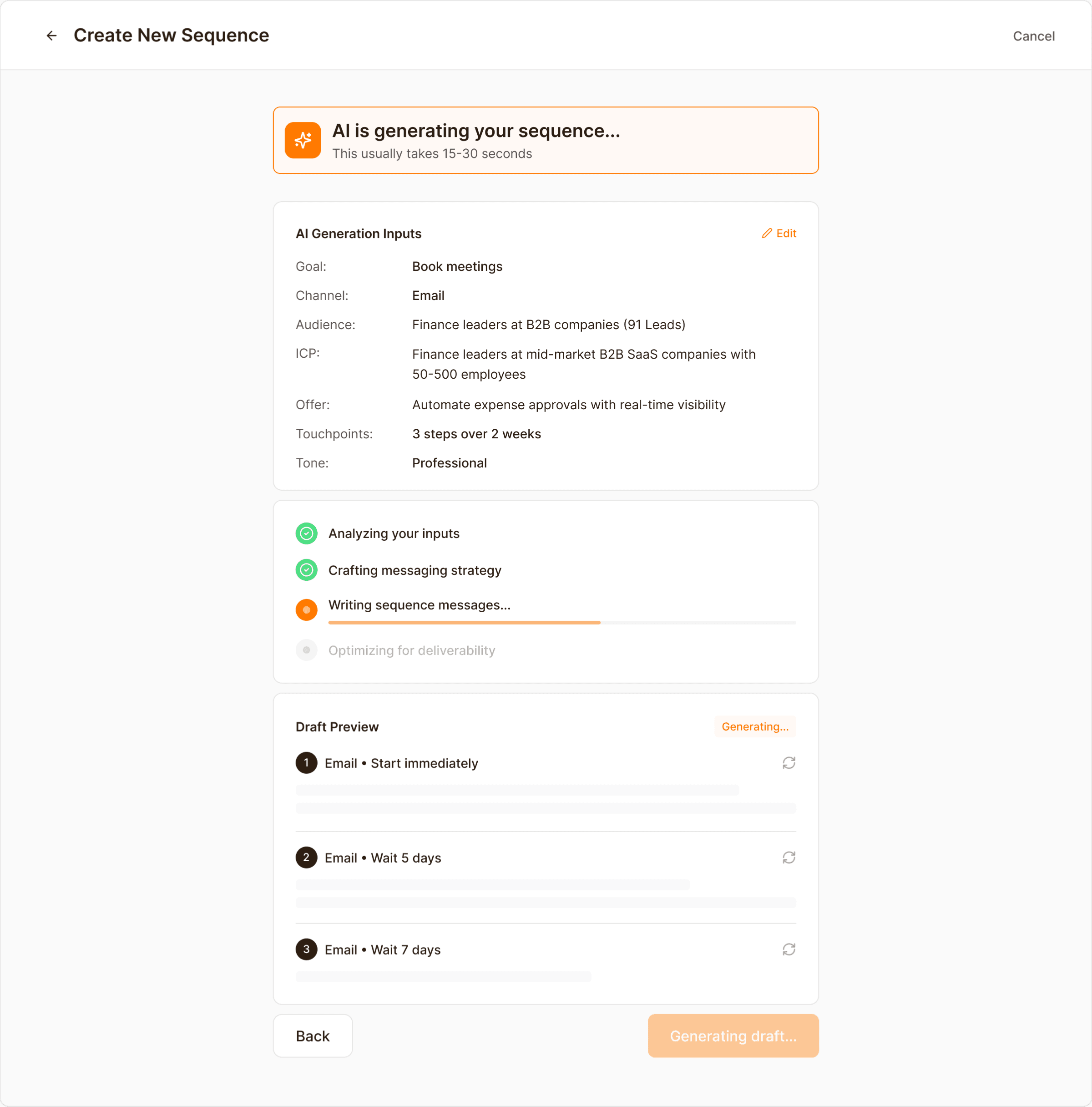
Instead of showing a generic loading state, I made the generation step transparent. Users can review the inputs being used, see the generation stages in progress, and preview the draft structure as it is being created. This makes the AI feel more trustworthy and reduces the feeling of “black box” automation.
Instead of showing a generic loading state, I made the generation step transparent. Users can review the inputs being used, see the generation stages in progress, and preview the draft structure as it is being created. This makes the AI feel more trustworthy and reduces the feeling of “black box” automation.
Review and Edit
Review and Edit
I treated review as an active editing stage, not a passive preview. Users can adjust timing, subject lines, and message copy step by step, while a side AI assistant helps refine the sequence without taking control away. This stage also improves the existing “Review Your Sequence” frame by making editing feel more structured, contextual, and launch-oriented.
I treated review as an active editing stage, not a passive preview. Users can adjust timing, subject lines, and message copy step by step, while a side AI assistant helps refine the sequence without taking control away. This stage also improves the existing “Review Your Sequence” frame by making editing feel more structured, contextual, and launch-oriented.

Schedule and Sending Rules
Schedule and Sending Rules
Once the content is ready, users move into schedule and sending rules. I separated these operational decisions from message editing so each step stays focused. Sending windows, weekdays, recipient timezone logic, and daily volume limits make the system feel more deliberate, controllable, and ready for real sales workflows.
Once the content is ready, users move into schedule and sending rules. I separated these operational decisions from message editing so each step stays focused. Sending windows, weekdays, recipient timezone logic, and daily volume limits make the system feel more deliberate, controllable, and ready for real sales workflows.

Final Step: Launch Checklist and Confirmation
Final Step: Launch Checklist and Confirmation
Before launch, I added a final checklist to confirm that the critical pieces are in place: connected leads, reviewed sequence steps, valid personalization fields, schedule configuration, and daily send limits. This final pause is designed to reduce preventable mistakes and give users the confidence to launch.
Before launch, I added a final checklist to confirm that the critical pieces are in place: connected leads, reviewed sequence steps, valid personalization fields, schedule configuration, and daily send limits. This final pause is designed to reduce preventable mistakes and give users the confidence to launch.

Design System
Design System
Chakra foundation, Flamey expression
Chakra foundation, Flamey expression
I used the Chakra UI Figma kit as a foundation, then adapted it to fit Flamey’s product needs and brand expression. Chakra helped me move faster, while Flamey’s direction shaped the final visual language.
I leaned on Chakra’s form, input, card, tag, and button patterns to speed up the prototype, then tailored them to support Flamey’s guided builder, AI states, and review flow.
I used the Chakra UI Figma kit as a foundation, then adapted it to fit Flamey’s product needs and brand expression. Chakra helped me move faster, while Flamey’s direction shaped the final visual language.
I leaned on Chakra’s form, input, card, tag, and button patterns to speed up the prototype, then tailored them to support Flamey’s guided builder, AI states, and review flow.
Color system
Color system
Brand Primary: Deep Brown #2D1E12 for primary text, selected controls, and strong structural emphasis.
#1B120B
#24180E
#2D1E12
#574B41
#817871
#ABA5A0
#D5D2D0
Brand Accent: Spark Orange #FF7A00 for action, AI accents, and progress emphasis.
#803D00
#CC6200
#FF7A00
#FF9533
#FFAF66
#FFCA99
#FFE4CC
Neutral System: Slate Black #22333B supports depth, contrast, and dense product surfaces, while
Snow #FAFAFA keeps the interface light, readable, and spacious.
#141F23
#1B292F
#22333B
#7A8589
#A7ADB1
#D3D6D8
#FAFAFA
Semantic Success: Green #059669 for completed states, and positive checklist feedback.
#023C2A
#035A3F
#059669
#37AB87
#69C0A5
#9BD5C3
#ECFDF5
Semantic Warning: Red #FB2424 for destructive actions, validation issues, and launch-risk alerts.
#640E0E
#971616
#FB2424
#FC5050
#FD7C7C
#FDA7A7
#FED3D3
Semantic Information: Blue #244BFB for guidance, and informative system messaging.
#0E1E64
#162D97
#244BFB
#506FFC
#7C93FD
#A7B7FD
#ECEFFF
Typography
Typography
Display: Poppins for page titles and key section labels.
Body: Inter for form labels, helper text, body copy, and dense operational content. That combination helped me balance brand warmth with operational clarity across the workflow.
Display: Poppins for page titles and key section labels.
Body: Inter for form labels, helper text, body copy, and dense operational content. That combination helped me balance brand warmth with operational clarity across the workflow.
Spacing and layout
Spacing and layout
I standardized around a 4px base system, with 8, 12, 16, 24, and 32 as the most common working increments. The builder screens stay mostly single-column because the content is cognitively dense and benefits from a clear reading path. The review screen is the intentional exception: desktop space is used for a parallel AI assistant without crowding the main editor.
I standardized around a 4px base system, with 8, 12, 16, 24, and 32 as the most common working increments. The builder screens stay mostly single-column because the content is cognitively dense and benefits from a clear reading path. The review screen is the intentional exception: desktop space is used for a parallel AI assistant without crowding the main editor.
AI in This Project
AI in This Project
AI Accelerated the Workflow. I Owned the Decisions.
AI Accelerated the Workflow. I Owned the Decisions.
AI was a workflow accelerator, not a replacement for design thinking.
I used it to:
Synthesize research notes quickly
Compare alternative product framings
Generate flow variations for evaluation
Iterate on UX writing
Reduce blank-page time
Speed up early layout exploration
I did not accept outputs blindly. I filtered aggressively, rewrote extensively, and made final decisions based on product logic and user clarity.
AI increased breadth and speed. Judgment remained mine.
AI was a workflow accelerator, not a replacement for design thinking.
I used it to:
Synthesize research notes quickly
Compare alternative product framings
Generate flow variations for evaluation
Iterate on UX writing
Reduce blank-page time
Speed up early layout exploration
I did not accept outputs blindly. I filtered aggressively, rewrote extensively, and made final decisions based on product logic and user clarity.
AI increased breadth and speed. Judgment remained mine.

Outcome
Outcome
What I Delivered in 4 Days
What I Delivered in 4 Days
Each screen solves one problem: weak networking, getting lost in the process, irrelevant job posts, or privacy concerns, all while keeping LinkedIn’s familiar look. Together they turn job hunting from scattered chaos into a clear, guided path.
Each screen solves one problem: weak networking, getting lost in the process, irrelevant job posts, or privacy concerns, all while keeping LinkedIn’s familiar look. Together they turn job hunting from scattered chaos into a clear, guided path.
In 96 hours, I delivered:
A fully defined product concept
Structured user flows
High-fidelity UI
Interactive prototype
Clear product narrative
In 96 hours, I delivered:
A fully defined product concept
Structured user flows
High-fidelity UI
Interactive prototype
Clear product narrative
The result demonstrates my ability to:
Frame ambiguous problems quickly
Prioritize under pressure
Balance speed and quality
Use AI responsibly within a design workflow
Translate complexity into clarity
The result demonstrates my ability to:
Frame ambiguous problems quickly
Prioritize under pressure
Balance speed and quality
Use AI responsibly within a design workflow
Translate complexity into clarity
As a prototype, this work demonstrates a clearer path from sequence intent to launch readiness, with stronger AI transparency, better editing control, and more pre-launch confidence.
As a prototype, this work demonstrates a clearer path from sequence intent to launch readiness, with stronger AI transparency, better editing control, and more pre-launch confidence.

Reflection
Reflection
What This Challenge Reinforced
What This Challenge Reinforced
This project reinforced a few core beliefs:
Speed does not replace clarity. It demands sharper prioritization.
Constraints improve product thinking.
The hardest part is not designing screens, but deciding what not to build.
AI is most powerful when used to expand thinking, not outsource it.
Designing under a 96-hour constraint forced me to rely on judgment, structure, and disciplined decision-making. The result is not just a prototype. It is a focused product story shaped by intentional tradeoffs.
This project reinforced a few core beliefs:
Speed does not replace clarity. It demands sharper prioritization.
Constraints improve product thinking.
The hardest part is not designing screens, but deciding what not to build.
AI is most powerful when used to expand thinking, not outsource it.
Designing under a 96-hour constraint forced me to rely on judgment, structure, and disciplined decision-making. The result is not just a prototype. It is a focused product story shaped by intentional tradeoffs.